
Sales Management
What it is for
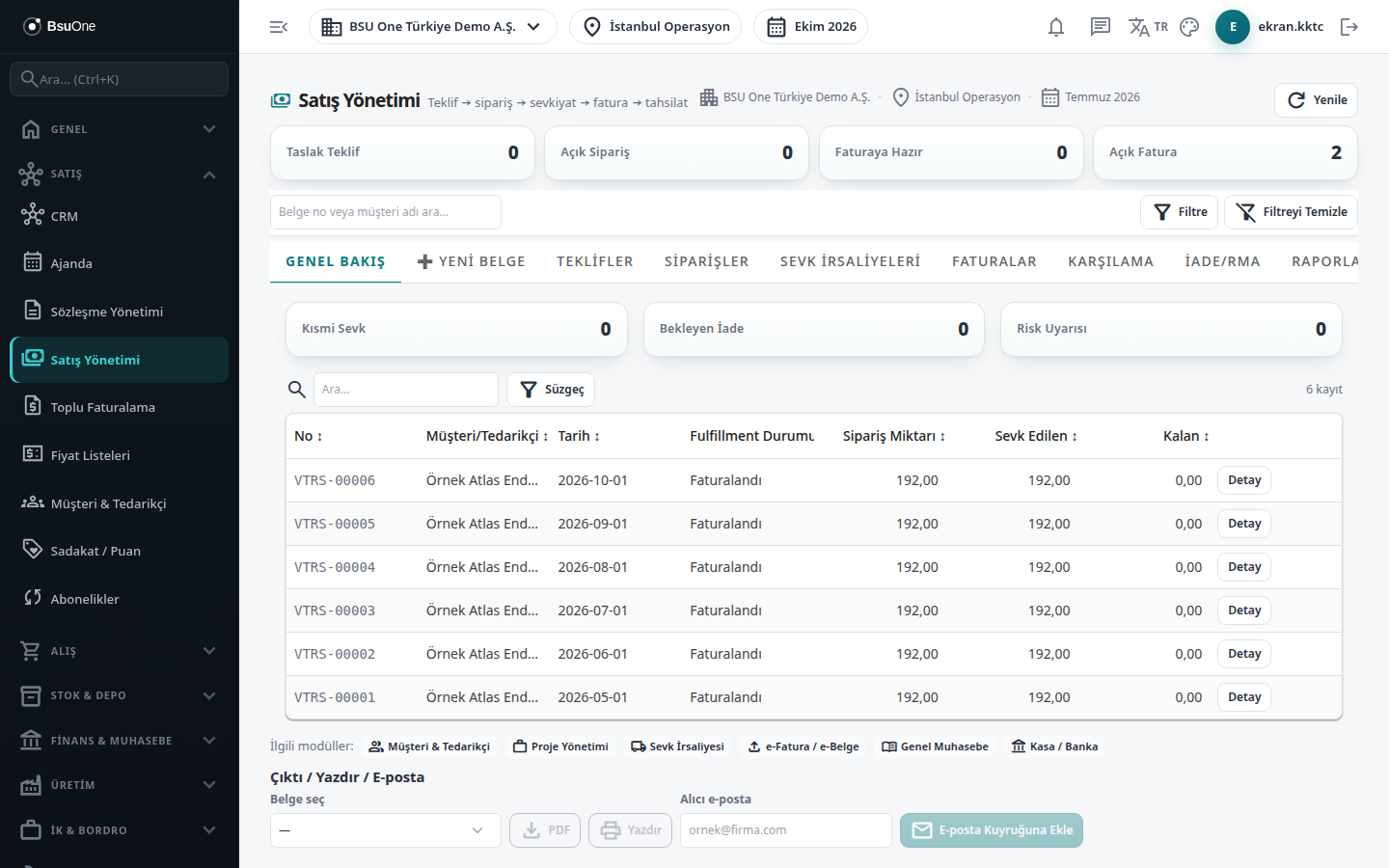
Section titled “What it is for”Sales Management (Satış Yönetimi) gathers all sales documents that go to the customer in one place: Quotes, Orders, Dispatch Notes and Invoices. Documents form a linked chain (quote, order, dispatch note, invoice). Every document is born as a Draft; approval and the accounting entry run from the Approval tab.
At the top of the screen are four summary boxes: Draft Quotes, Open Orders, Ready to Invoice and Open Invoices. The search box below (document number or customer name) and the Filter drawer filter the lists in all tabs.
Who uses it
Section titled “Who uses it”Sales, shipping and accounting staff and the company manager. Permission is given on the Documents page of the role screen: View (lists and document detail), Add (creating, converting, returns and commission work), Edit (editing a draft) and Delete (deleting a draft, cancelling an approved dispatch note).
Screens
Section titled “Screens”- Overview (Genel Bakış): partial shipment, pending return and risk warning counts; order fulfillment table.
- New Document (➕ Yeni Belge): create a quote, order or invoice draft.
- Quotes (Teklifler): the quote list and conversion to an order.
- Orders (Siparişler): order list, conversion to dispatch note / invoice, revision, repeat order, stock reservation.
- Dispatch Notes (Sevk İrsaliyeleri): sales dispatch notes, conversion to invoice, cancelling a shipment.
- Invoices (Faturalar): sales invoices, source filter, e-invoice link.
- Fulfillment (Karşılama): shipment status and remaining quantity per order.
- Returns / RMA (İade/RMA): return, repair or exchange from an invoice.
- Reports (Raporlar): top selling products from approved invoices.
- Commission (Komisyon): commission plan, accrual and transfer to payroll.
- Settings (Ayarlar): series, parameter and module links; the partial shipment switch.
Typical workflow
Section titled “Typical workflow”- Create a quote or order draft with New Document.
- Open the document from the list and send it for approval on the Approval tab.
- Convert the quote to an order and the order to a dispatch note (or plan a partial shipment from the Dispatch screen).
- Approve the dispatch note; invoice one dispatch note with To Invoice, or several with Consolidated Invoicing.
- Approve the invoice; send it from the E-Invoice screen if needed; use the Returns / RMA tab for faulty or returned goods.
Related modules
Section titled “Related modules”Step-by-step screen guides are currently available in Turkish; the links above open them.