
Contract Management
What it is for
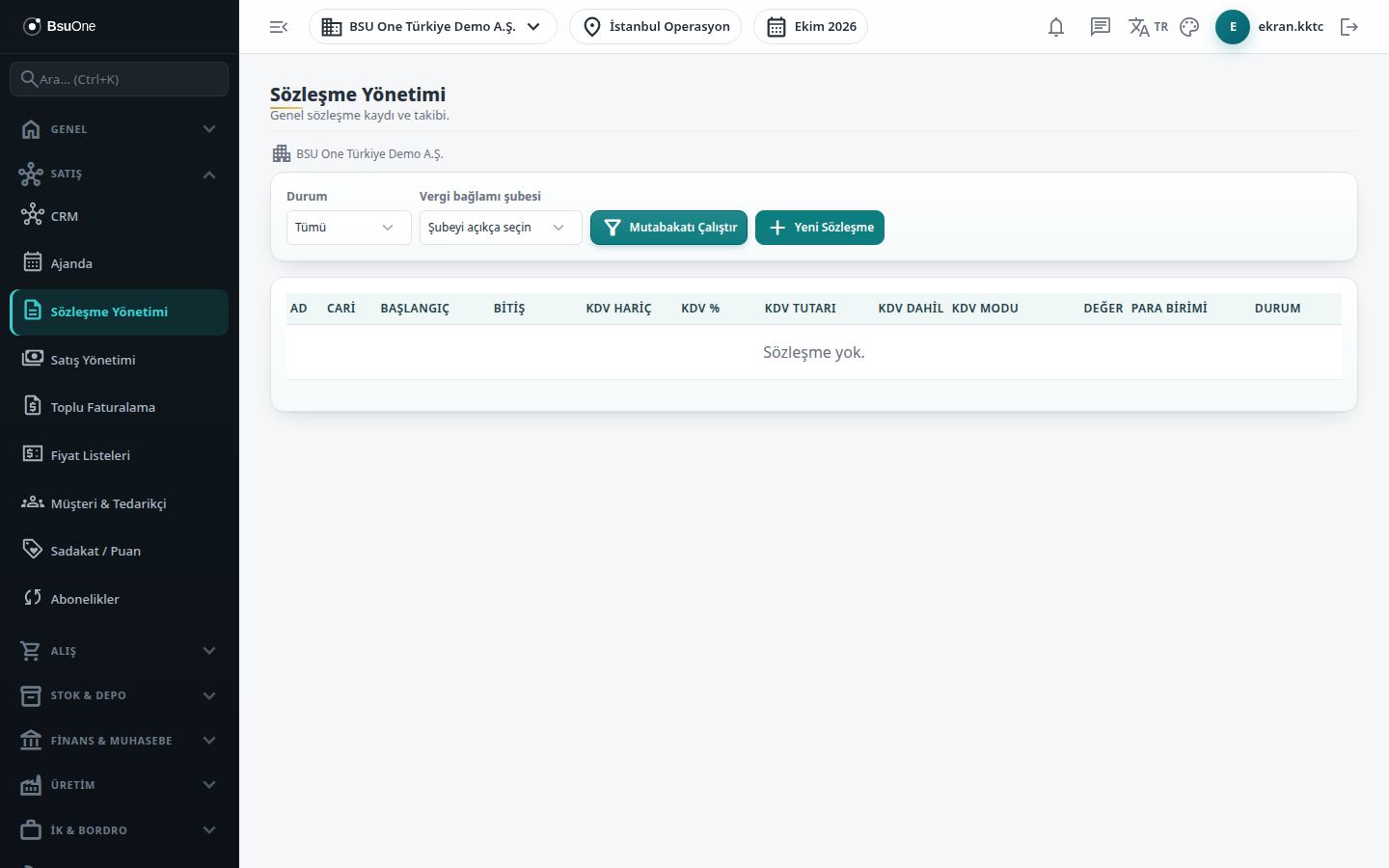
Section titled “What it is for”Contract Management (Sözleşme Yönetimi) keeps the company’s general contract register: name, account, start/end/renewal date, value, VAT information, status and note. The Upcoming Renewals panel at the top highlights active contracts that must soon be renewed or end. When a contract value is entered, the amount excluding VAT, the VAT amount and the total including VAT are calculated from the VAT rate table and stored with the contract.
Who uses it
Section titled “Who uses it”Sales managers, legal and finance staff. Permission is on the Contract Management row of role page permissions (this screen uses its own permission, not the CRM one): View shows the list, Add opens new contract and edit, Delete shows the delete button.
Screens
Section titled “Screens”- Upcoming Renewals (30 Days): active contracts whose renewal date (or end date) falls within the next 30 days.
- Status filter: All, Draft, Active, Expired, Cancelled; choose the tax context branch if you want to pick a VAT band.
- New Contract / Edit Contract: add or change a contract; delete asks no confirmation.
- List columns: amount excluding VAT, VAT %, VAT amount, amount including VAT, VAT mode, value, currency and status.
Related modules
Section titled “Related modules”Step-by-step screen guides are currently available in Turkish; the links above open them.