
Dock Schedule
What it is for
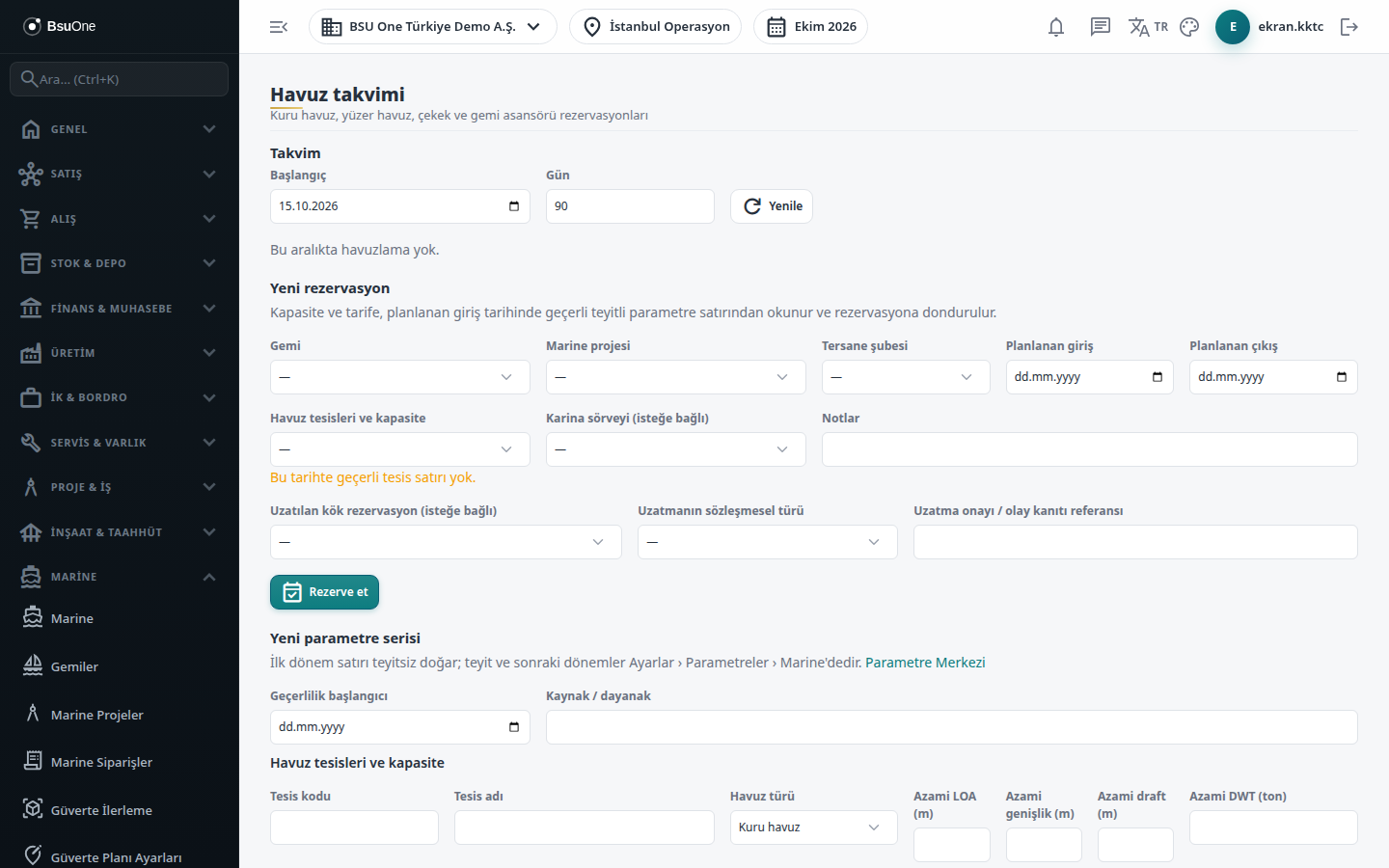
Section titled “What it is for”The Docking Calendar (Havuz Takvimi) shows reservations of dry docks, floating docks, slipways and ship lifts per facility in one chart, and you open new reservations from here. The Technical operation and measurement card icon at the end of a row takes you to that docking’s card, where you handle block plan approval, docking in, hull washing / blasting records, sea chest valve acceptance, shaft and rudder clearance measurement, departure, the dock fee and transferring the fee to a claim period.
Dock capacity, daily and fixed tariffs and class wear thresholds are not written into the program; they are read from the dated rows in Settings › Parameters.
Who uses it
Section titled “Who uses it”Shipyard planning, the dock officer, the technical office and the project manager. On the Marine page in Settings › Roles: View sees the calendar and card, Add opens reservations and docking work orders, Edit docks in, cancels a reservation and records technical measurements, Approve approves the block plan, accepts valve maintenance, links the remedy of a tolerance excess, approves departure and transfers the fee to a claim. The New parameter series section is visible only to those with Add on the Settings › Parameters page.
Screens
Section titled “Screens”- Calendar: start date and number of days (7 to 365), then Refresh; each row shows facility, vessel, status, planned and actual dates in a colored chart.
- New reservation: vessel, optional Marine project, shipyard branch, planned arrival and departure; entering the planned arrival lists the facilities valid that day with capacity. The product checks the vessel’s dimensions against the facility limits and for overlapping active reservations. An optional hull survey and notes can be added. To extend a stay, first open an adjacent new reservation at the same facility and link the root reservation.
- Technical operation and measurement card: summary of status, dates, dock type, facility limits and tariff values stored on the reservation.
- Blocking plan and arrival: enter the blocking plan number and block height, then approve the plan; a ship cannot be docked without an approved plan. Then enter the actual arrival and Dock; the status becomes In dock.
- Underwater technical operations: drainage completed, hull wash pressure, blasting standard, DFT measurement and so on. When you enter a clearance measurement the product finds the class threshold row valid on the measurement date and stores its value with the measurement; a clearance above the threshold warns and locks departure until the remedy is linked.
- Valve maintenance: record the pressure test, then accept the sea chest valves (needs Approve; without a pressure test value it cannot be accepted).
- Remedy of a tolerance excess: link a completed Marine repair work order or an open, in-deadline class condition.
- Docking work order: one per reservation.
- Departure: actual departure, floating completed and fresh water, then Approve departure.
- Dock fee and claim: when the status is Departed (completed) it shows days, weekend days, fee, TL equivalent and rate; choose a Marine master order and period number to Transfer to claim.
Typical workflow
Section titled “Typical workflow”- Open a reservation in the calendar.
- Open the card, approve the block plan and dock the vessel.
- Record the underwater technical operations and measurements; accept the valves and link any remedy.
- Approve the departure.
- Review the dock fee and transfer it to a claim period.
Related modules
Section titled “Related modules”Step-by-step screen guides are currently available in Turkish; the links above open them.